
Google 推出的「来源偏好」嵌入组件,简化了读者将出版物添加为 Preferred Sources 的操作流程。相比直接使用深链接(deeplink),嵌入按钮能省去一步手动选择,让整个流程从读者点击到完成只需单次操作。本文介绍两种实现方式,并提供可直接用于 WordPress 的挂件代码。
来源偏好功能有什么用
「来源偏好」(Preferred Sources)影响的是单个 Google 用户在将你的出版物设为偏好后看到的内容。它不会提升网站在所有用户面前的排名,也不能保证文章一定会出现在「热点新闻」中。
根据 Google 官方文档,该功能面向全球用户开放,覆盖所有支持 Google 搜索的语言。符合条件的来源还可能在 AI Overviews 和 AI Mode 中获得突出展示。
添加按钮前的资格校验
在动手之前,先到 Google 的来源偏好设置工具搜索你的出版物。如果搜索不到,添加按钮也无法解决资格问题。
Google 支持的域名形式包括:
- 根域名:
example.com - 子域名:
news.example.com
不支持子目录形式,例如 example.com/news。
若出版物本身托管在子域名上,必须使用该子域名,不能默认套用根域名。
方式一:标准嵌入按钮(推荐)
Google 建议使用官方标准 JavaScript 实现,原因在于:自动本地化,且能将读者准确返回至起始页面。
嵌入按钮 vs 深链接:实测对比
在移动端测试两种路径,观察到明显差异: 嵌入按钮:Google 直接打开该出版物的专属确认页,来源已自动识别,读者只需点击「添加」,随后 Google 自动返回文章页。整个流程从点击网站到完成,仅需一次操作。

深链接:打开的是通用「来源偏好」页面,出版物名称虽已预填,但读者仍需手动勾选复选框。更重要的是,Google 不会自动将读者返回文章页——需要额外一步。
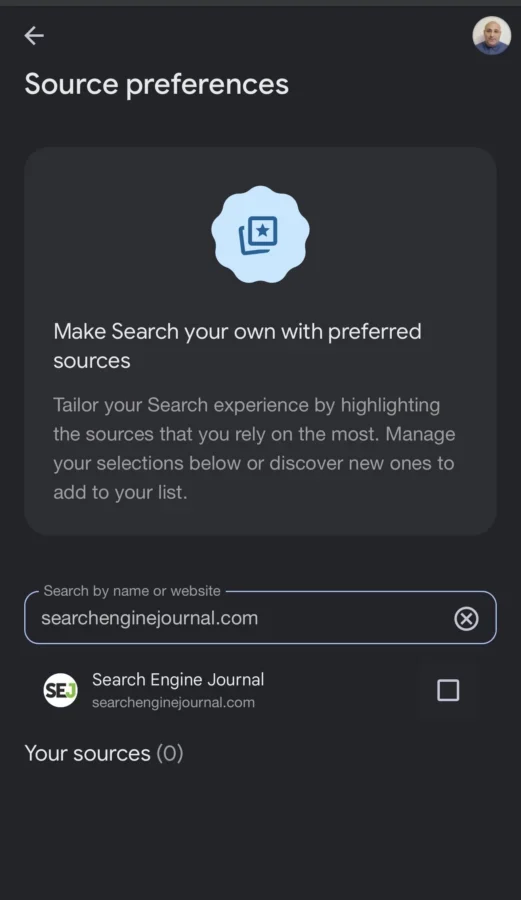
深链接打开通用来源偏好页面,读者仍需手动选择出版物。
结论:若条件允许,优先使用标准嵌入按钮。深链接适用于邮件、社交帖子或 CMS 无法插入脚本的场景。
引入方式
在页面 <head> 中引入一次库文件(建议放在应用外壳、主题或小插件中):
然后在希望显示按钮的位置放置容器:
库文件通过属性自动识别并渲染界面,无需硬编码出版物域名。
主题切换:浅色与深色
默认使用浅色主题。若页面背景为深色,添加 data-theme 属性切换:
语言覆盖:仅在必要时设置
按钮默认读取读者浏览器的语言。如需强制指定受支持的某种语言,使用 data-lang:
方式二:深链接(无法插入 JavaScript 时使用)
深链接本质是一个普通链接,因此可以在任何 CMS 或 HTML 编辑器中直接添加,无需 JavaScript 支持。 https://www.google.com/preferences/source?q=example.com 可作为普通链接使用:
<p><a href="https://www.google.com/preferences/source?q=example.com">将 Example 添加为来源偏好</a></p>
该链接同样适用于页面正文、邮件、社交帖子或推广内容中。
WordPress 挂件实现
以下代码创建一个 WordPress 挂件,可放置在文章侧边栏、页脚等任意小工具区域。编辑器可在后台选择浅色/深色主题,并调整按钮对齐方式(左对齐、居中、右对齐)。
将代码添加至自定义小插件或子主题的 functions.php 文件中:
为 WordPress 添加 Google Preferred Sources 按钮
将以下代码保存为插件或主题的 functions.php 文件,即可注册一个名为 Google Preferred Sources 的小工具。
class Site_Preferred_Sources_Widget extends WP_Widget {
 public function __construct() {
 parent::__construct(
 'site_preferred_sources',
 'Google Preferred Sources',
 array( 'description' => 'Displays the Google Preferred Sources button.' )
 );
 }
 private function get_alignment( $value ) {
 return in_array( $value, array( 'left', 'center', 'right' ), true ) ? $value : 'center';
 }
 public function widget( $args, $instance ) {
 $theme = isset( $instance['theme'] ) && 'dark' === $instance['theme'] ? 'dark' : 'light';
 $alignment = $this->get_alignment( isset( $instance['alignment'] ) ? $instance['alignment'] : 'center' );
 $justify_content = array(
 'left' => 'flex-start',
 'center' => 'center',
 'right' => 'flex-end',
 );
 echo $args['before_widget'];
 echo '<div style="display:flex;width:100%;justify-content:' . esc_attr( $justify_content[ $alignment ] ) . ';">';
 echo '<div google-add-preferred-source-btn';
 if ( 'dark' === $theme ) {
 echo ' data-theme="dark"';
 }
 echo '></div>';
 echo '</div>';
 echo $args['after_widget'];
 }
 public function form( $instance ) {
 $theme = isset( $instance['theme'] ) && 'dark' === $instance['theme'] ? 'dark' : 'light';
 $alignment = $this->get_alignment( isset( $instance['alignment'] ) ? $instance['alignment'] : 'center' );
 ?>
 <label for="<?php echo esc_attr( $this->get_field_id( 'theme' ) ); ?>"><?php esc_html_e( 'Color theme' ); ?></label>
 <select class="widefat" id="<?php echo esc_attr( $this->get_field_id( 'theme' ) ); ?>" name="<?php echo esc_attr( $this->get_field_name( 'theme' ) ); ?>">
 <option value="light" <?php selected( $theme, 'light' ); ?>>Light</option>
 <option value="dark" <?php selected( $theme, 'dark' ); ?>>Dark</option>
 <label for="<?php echo esc_attr( $this->get_field_id( 'alignment' ) ); ?>"><?php esc_html_e( 'Alignment' ); ?></label>
 <select class="widefat" id="<?php echo esc_attr( $this->get_field_id( 'alignment' ) ); ?>" name="<?php echo esc_attr( $this->get_field_name( 'alignment' ) ); ?>">
 <option value="left" <?php selected( $alignment, 'left' ); ?>>Left</option>
 <option value="center" <?php selected( $alignment, 'center' ); ?>>Center</option>
 <option value="right" <?php selected( $alignment, 'right' ); ?>>Right</option>
 <?php
 }
 public function update( $new_instance, $old_instance ) {
 $instance = array();
 $instance['theme'] = isset( $new_instance['theme'] ) && 'dark' === $new_instance['theme'] ? 'dark' : 'light';
 $instance['alignment'] = $this->get_alignment( isset( $new_instance['alignment'] ) ? sanitize_key( $new_instance['alignment'] ) : 'center' );
 return $instance;
 }
}
function site_register_preferred_sources_widget() {
 register_widget( 'Site_Preferred_Sources_Widget' );
}
add_action( 'widgets_init', 'site_register_preferred_sources_widget' );
function site_preferred_sources_widget_script() {
 if ( ! is_active_widget( false, false, 'site_preferred_sources', true ) ) {
 return;
 }
 wp_enqueue_script(
 'google-preferred-sources',
 'https://news.google.com/swg/js/v1/publisher.js',
 array(),
 null,
 array( 'strategy' => 'async', 'in_footer' => true )
 );
 $tracking_script = <<<'JS'
(function () {
 if ( window.__preferredSourceButtonTrackingBound ) { return; }
 window.__preferredSourceButtonTrackingBound = true;
 function isPreferredSourceClick( event ) {
 var path = typeof event.composedPath === 'function' ? event.composedPath() : [];
 for ( var i = 0; i < path.length; i += 1 ) {
 var node = path[i];
 if ( node && node.nodeType === 1 && typeof node.hasAttribute === 'function' && node.hasAttribute( 'google-add-preferred-source-btn' ) ) {
 return true;
 }
 }
 return Boolean( event.target && typeof event.target.closest === 'function' && event.target.closest( '[google-add-preferred-source-btn]' ) );
 }
 function hasGoogleTagManager() {
 if ( ! window.google_tag_manager ) { return false; }
 return Object.keys( window.google_tag_manager ).some( function ( key ) {
 return key.indexOf( 'GTM-' ) === 0;
 } );
 }
 document.addEventListener( 'click', function ( event ) {
 if ( ! isPreferredSourceClick( event ) ) { return; }
 if ( hasGoogleTagManager() && Array.isArray( window.dataLayer ) ) {
 window.dataLayer.push( { event: 'preferred_source_button_click' } );
 return;
 }
 if ( typeof window.gtag === 'function' ) {
 window.gtag( 'event', 'preferred_source_button_click' );
 }
 }, true );
}());
JS;
 wp_add_inline_script( 'google-preferred-sources', $tracking_script, 'after' );
}
add_action( 'wp_enqueue_scripts', 'site_preferred_sources_widget_script' );
使用方法
代码部署后,前往 Appearance → Widgets,将 Google Preferred Sources 小工具拖入侧边栏或页脚区域。配置项包括:
- Color theme:浅色(Light)或深色(Dark)
- Alignment:按钮对齐方式,支持左对齐、居中、右对齐
WordPress 只会加载一次 publisher.js,即使该小工具出现在多个区域也不会重复请求。
在 GA4 中追踪按钮点击
Google 会在页面加载完成后才渲染徽章按钮,因此这里采用事件委托监听点击。追踪的是"用户点击了 Preferred Sources 入口",而非"用户在 Google 侧完成了来源订阅"。
有 Google Tag Manager 的情况
事件会被推入默认 dataLayer:
window.dataLayer.push( { event: 'preferred_source_button_click' } );

在 GTM 中创建同名自定义事件触发器(`preferred_source_button_click`),再绑定一个 GA4 Event 标签即可。
无 GTM、仅有 gtag.js 的情况
代码会自动降级调用 gtag:
window.gtag( 'event', 'preferred_source_button_click' );
建议发布前用 GTM Preview 或 GA4 DebugView 验证一次事件是否正常触发。该事件也可作为 SEO 效果报告中的 KPI。
核心结论
Preferred Sources 并非直接排名因素,它的实际价值在于:让明确认可该出版物的读者在 Google Top Stories(以及 AI Overviews、AI Mode 等场景)中持续看到你的内容,从而帮助站点积累回访用户。 这不是"万能排名加成",而是"在已认可你的读者群中争取更多曝光机会"的一种手段。